Uploading a prescription online means submitting a photo of a doctor's prescription through a pharmacy delivery platform so a licensed pharmacy can prepare and dispense the exact medicine prescribed, without an in-person pharmacy visit.
The process takes a few minutes: open the upload section, fill in your details, attach the prescription photo, and submit. The pharmacy and rider handle the rest. Below is the full walkthrough, what to check before submitting, and why this step exists in the first place.
This guide reflects how prescription handling actually works on SehatKart's platform, where every order is routed to a DRAP-verified local pharmacy rather than an unverified seller. SehatKart currently operates in Sadiqabad, Punjab, with expansion to other Pakistani cities planned as the platform grows.
Why Prescription Uploads Exist as a Separate Step?
A prescription-only medicine requires confirmation that a licensed doctor actually prescribed it before a pharmacy can legally dispense it. This isn't a platform formality, it's the same legal requirement that applies at any physical pharmacy counter.
Research on online pharmacy practices has found this check is sometimes skipped entirely: one investigation found that only a small fraction of online pharmacies assessed actually required a prescription before dispensing prescription-only medicines, a gap that public health researchers link directly to risks like unnecessary antibiotic use and the resulting drug resistance.
A dedicated upload step, separate from a regular product order, exists specifically to keep that check intact rather than letting it get skipped in the name of convenience.
How to Upload a Prescription on SehatKart? Step-by-Step
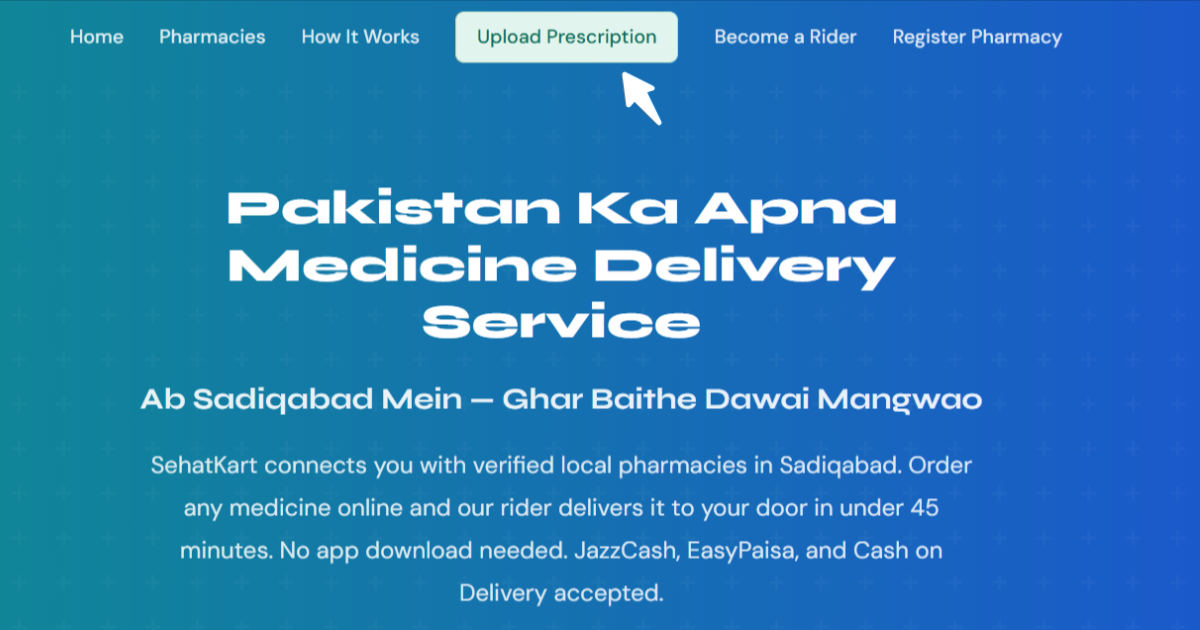
Step 1: Go to sehatkart.co and click Upload Prescription
The upload prescription option sits in the main navigation bar at the top of the homepage, next to Pharmacies and How It Works.
Step 2: Fill in your details
The upload section asks for your basic contact and delivery information, name, phone number, and delivery address in Sadiqabad, so the assigned pharmacy and rider know exactly where to send the medicine once it's ready.
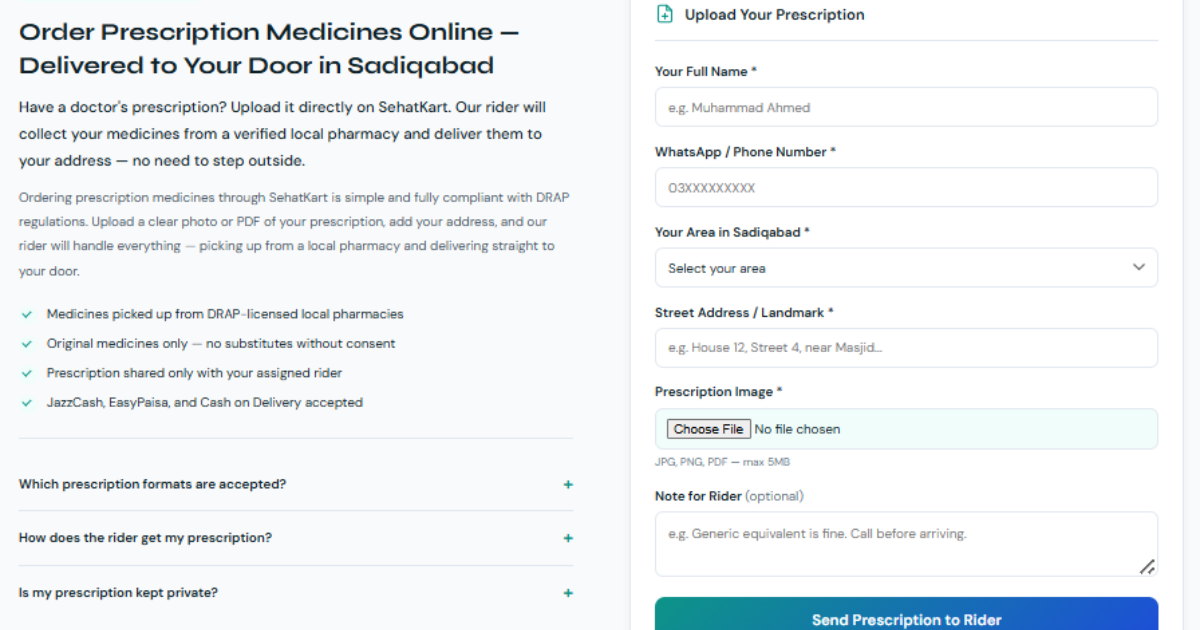
Step 3: Attach a clear photo of your prescription
Take a photo of the prescription where the doctor's handwriting, the medicine names, and any dosage instructions are clearly visible — a blurry or partially cropped image is the single most common reason a pharmacy has to follow up before it can proceed.
Bonus tip: Photograph the prescription flat, in good light, with the full page in frame, including the doctor's signature and stamp if present. A clean image the first time skips a back-and-forth that would otherwise add minutes to getting your order confirmed.
Step 4: Hit Send
Submitting the form sends the prescription into SehatKart's system, where it becomes visible to active riders as a new prescription order.
Step 5: SehatKart takes it from there
Once submitted, the order is picked up by a rider, taken to a DRAP-verified pharmacy, fulfilled against your prescription, and delivered to your address. You don't need to call a pharmacy yourself or confirm anything further unless there's a question about the prescription itself.
What Happens Behind the Scenes
| Stage | What Occurs |
|---|---|
| Submission | Prescription and contact details are saved; no medicine details shared publicly yet |
| Rider notification | Active riders are alerted that a new prescription order is available |
| Acceptance | First rider to accept gets full order details — your name, phone, address, and the prescription image |
| Fulfillment | Rider takes the prescription to a DRAP-verified pharmacy for the medicine to be prepared |
| Delivery | Rider delivers the completed order to your address |
What to Check Before Uploading a Prescription
A few checks before hitting submit prevent the most common delays:
- Is the prescription current? A prescription with an old date may need pharmacist confirmation before it's filled, particularly for medicines requiring ongoing monitoring.
- Is your delivery address complete and accurate? A missing landmark or unclear street detail is a common cause of delivery delays in areas without standardized addressing.
- Does the photo show the entire prescription, not just the medicine list? Doctor's notes, dosage instructions, and the signature/stamp all matter for the pharmacy to fill it correctly and legally.
- Are you ordering during active hours? Submitting outside the platform's operating window means the order is queued rather than acted on immediately.
Common Questions
Do I need to create an account before uploading a prescription?
The upload section is accessible directly from the homepage navigation, so a prescription can be submitted without an extensive setup process, contact and delivery details are collected as part of the upload form itself.
What if my prescription is for more than one medicine?
A single prescription photo covering multiple prescribed medicines can be uploaded in one submission, the pharmacy fills the full prescription as written by the doctor. If you're confused about the quantity of medicine, write it in the notes for rider box.
Can I upload a prescription for someone else, like a parent or child?
Yes, enter the delivery address and contact details for wherever the medicine needs to go, which may be different from your own number if you're ordering on behalf of a family member.
What happens if the pharmacy doesn't have one of the prescribed medicines in stock?
The assigned pharmacy or rider will reach out using the contact details provided to flag the issue and discuss next steps, rather than silently substituting a different product.
How long does it take for my prescription to be accepted by a rider?
This depends on rider availability at the time of submission. A clear, complete prescription photo with no missing details tends to move faster since there's no need for follow-up clarification.
Is my prescription information kept private?
Prescription details, including the image itself, are only shared with the rider who accepts the order and the pharmacy fulfilling it, they aren't visible to other riders browsing available orders before acceptance.
Can I track my prescription order after submitting it?
Once a rider accepts the order, you'll be contacted directly using the phone number provided, and standard order tracking applies the same way it does for a regular medicine order.
What if I need to cancel or change my prescription order after submitting it?
Contact SehatKart support or call us at +923006707390 as soon as possible after submission. Once a rider has accepted and a pharmacy has begun fulfillment, changes get harder to make, so earlier contact gives the best chance of adjusting the order.
Can I reuse the same prescription for a refill later?
A prescription for an ongoing condition can generally support a refill order, but the pharmacy may ask to confirm validity if significant time has passed since the original prescription date, when in doubt, check with your doctor or pharmacist first.
Final Words
Uploading a prescription online is a short process. Fill in delivery details, attach a clear photo, and submit, but it exists to preserve a real safety check that protects against unverified dispensing, not to add friction for its own sake.
For a one-time over-the-counter need, browsing pharmacies directly is usually simpler; for anything prescription-only, the upload flow is built specifically for that case.
Order Your Medicine Today
Head to sehatkart.co, click Upload Prescription, and submit your details along with a clear photo of your prescription. SehatKart takes it from there, matching it to a DRAP-verified pharmacy in Sadiqabad and getting it delivered to your door. For questions before submitting, reach out at support@sehatkart.co or message +92 300 6707390 on WhatsApp. Don't need a prescription filled right now? Browse pharmacies directly on the site for over-the-counter products instead.
Sources: